gffffffffffffffff

fffffffffffffff

How will the future cell phones?

Mobile devices will change the way of the future performance of the business in a way never imagined afterDo you think that today's mobile phones is very strong ? Wait until 2050 to radically change your mind . Since then Apple will be forgotten ( maybe) because most of the technology...

Future of Cell Phones 2028

This mobile phone is completely flexible due to the technology behind it… it uses a graphene touch screne being graphene based makes it essentially .........

future cell phones !!

Do you think the current cell phone form factors will change in the future? This is a really open-ended question, but being the constantly innovating beings that we are,.......

عرض المشاركات المصنفة بحسب مدى الصلة بالموضوع لطلب البحث Android. تصنيف بحسب التاريخ عرض كل المشاركات

الخميس، 2 فبراير 2012

Android and Security

By Hiroshi Lockheimer, VP of Engineering, Android

The last year has been a phenomenal one for the Android ecosystem. Device activations grew 250% year-on-year, and the total number of app downloads from Android Market topped 11 billion. As the platform continues to grow, we’re focused on bringing you the best new features and innovations - including in security.

Adding a new layer to Android security
Today we’re revealing a service we’ve developed, codenamed Bouncer, which provides automated scanning of Android Market for potentially malicious software without disrupting the user experience of Android Market or requiring developers to go through an application approval process.

The service performs a set of analyses on new applications, applications already in Android Market, and developer accounts. Here’s how it works: once an application is uploaded, the service immediately starts analyzing it for known malware, spyware and trojans. It also looks for behaviors that indicate an application might be misbehaving, and compares it against previously analyzed apps to detect possible red flags. We actually run every application on Google’s cloud infrastructure and simulate how it will run on an Android device to look for hidden, malicious behavior. We also analyze new developer accounts to help prevent malicious and repeat-offending developers from coming back.

Android malware downloads are decreasing
The service has been looking for malicious apps in Market for a while now, and between the first and second halves of 2011, we saw a 40% decrease in the number of potentially-malicious downloads from Android Market. This drop occurred at the same time that companies who market and sell anti-malware and security software have been reporting that malicious applications are on the rise. While it’s not possible to prevent bad people from building malware, the most important measurement is whether those bad applications are being installed from Android Market - and we know the rate is declining significantly.

Android makes malware less potent
In addition to using new services to help prevent malware, we designed Android from the beginning to make mobile malware less disruptive. In the PC model, malware has more potential to misuse your information. We learned from this approach, designing Android for Internet-connected devices. Some of Android’s core security features are:

  • Sandboxing: The Android platform uses a technique called “sandboxing” to put virtual walls between applications and other software on the device. So, if you download a malicious application, it can't access data on other parts of your phone and its potential harm is drastically limited.
  • Permissions: Android provides a permission system to help you understand the capabilities of the apps you install, and manage your own preferences. That way, if you see a game unnecessarily requests permission to send SMS, for example, you don’t need to install it.
  • Malware removal: Android is designed to prevent malware from modifying the platform or hiding from you, so it can be easily removed if your device is affected. Android Market also has the capability of remotely removing malware from your phone or tablet, if required.

No security approach is foolproof, and added scrutiny can often lead to important improvements. Our systems are getting better at detecting and eliminating malware every day, and we continue to invite the community to work with us to keep Android safe.

الجمعة، 14 سبتمبر 2012

The Benefits & Importance of Compatibility

We built Android to be an open source mobile platform freely available to anyone wishing to use it. In 2008, Android was released under the Apache open source license and we continue to develop and innovate the platform under the same open source license -- it is available to everyone at: http://source.android.com. This openness allows device manufacturers to customize Android and enable new user experiences, driving innovation and consumer choice.

As the lead developer and shepherd of the open platform, we realize that we have a responsibility to app developers -- those who invested in the platform by adopting it and building applications specifically for Android. These developers each contribute to making the platform better -- because when developers support a platform with their applications, the platform becomes better and more attractive to consumers. As more developers build great apps for Android, more consumers are likely to buy Android devices because of the availability of great software content (app titles like Fruit Ninja or Google Maps). As more delighted consumers adopt Android phones and tablets, it creates a larger audience for app developers to sell more apps. The result is a strategy that is good for developers (they sell more apps), good for device manufacturers (they sell more devices) and good for consumers (they get more features and innovation).

In biological terms, this is sometimes referred to as an ecosystem. In economic terms, this is known as a virtuous cycle -- a set of events that reinforces itself through a feedback loop. Each iteration of the cycle positively reinforces the previous one. These cycles will continue in the direction of their momentum until an external factor intervenes and breaks the cycle.

When we first contemplated Android and formed the Open Handset Alliance, we wanted to create an open virtuous cycle where all members of the ecosystem would benefit. We thought hard about what types of external factors could intervene to weaken the ecosystem as a whole. One important external factor we knew could do this was incompatibilities between implementations of Android. Let me explain:

Imagine a hypothetical situation where the platform on each phone sold was just a little bit different. Different enough where Google Maps would run normally on one phone but run terribly slow on another. Let's say, for sake of example, that Android implemented an API that put the phone to sleep for a fraction of a second to conserve battery life when nothing was moving on the screen. The API prototype for such a function might look like SystemClock.sleep(millis) where the parameter "millis" is the number of milliseconds to put the device to sleep for.

If one phone manufacturer implemented SystemClock.sleep() incorrectly, and interpreted the parameter as Seconds instead of Milliseconds, the phone would be put to sleep a thousand times longer than intended! This manufacturer’s phone would have a terrible time running Google Maps. If apps don’t run well across devices due to incompatibilities, consumers would leave the ecosystem, followed by developers. The end of the virtuous cycle.

We have never believed in a “one size fits all” strategy, so we found a way to enable differentiation for device manufactures while protecting developers and consumers from incompatibilities by offering a free "compatibility test suite" (CTS). CTS is a set of software tools that tests and exercises the platform to make sure that (for example) SystemClock.sleep(millis) actually puts the device to sleep for only milliseconds. Like Android, the test suite is freely available to everyone under the Apache open source license: http://source.android.com/compatibility/cts-intro.html 

While Android remains free for anyone to use as they would like, only Android compatible devices benefit from the full Android ecosystem. By joining the Open Handset Alliance, each member contributes to and builds one Android platform -- not a bunch of incompatible versions. We’re grateful to the over 85 Open Handset Alliance members who have helped us build the Android ecosystem and continue to drive innovation at an incredible pace. Thanks to their support the Android ecosystem now has over 500 million Android-compatible devices and counting!

Posted by Andy Rubin, Senior Vice President of Mobile and Digital Content

الاثنين، 27 فبراير 2012

Android@Mobile World Congress: It’s all about the ecosystem.

Each and every day, we are humbled by the trajectory of Android and our partners.

With a year-on-year growth rate of more than 250%, 850,000 new Android devices are activated each day, jetting the total number of Android devices around the world past 300 million. These numbers are a testament to the break-neck speed of innovation that defines the Android ecosystem.

Last year at Mobile World Congress (MWC), we announced that there were more than 150,000 apps in Android Market. That number tripled to more than 450,000 apps today, with over one billion app downloads happening every month. Think about the astonishing number of songs Shazam’ed, places Qype’ed and foursquare mayorships! To celebrate the hard work and success of our developer community, we’ve built special “app pods” into our Android stand at MWC. Many of these featured apps demonstrate the latest Android innovations, such as Android Beam, which lets you share content like web pages, videos, directions, and apps—just by touching two Android phones back to back.


The Android Stand on the eve of Mobile World Congress 2012

If you walk around the Android stand, it’s also evident that our hardware partners are thriving. There are 100+ devices on display at the conveyor belt bar, which is just a small portion of the 800+ Android devices that have launched to date. And what better sign of innovation than the Bling Bot—powered by the >Android ADK—which can bedazzle your Galaxy Nexus backplate with perfect precision.

We’re just getting started at Mobile World Congress, so keep checking android.com/mwc and the +Android page on Google+ for updates.

الخميس، 31 أكتوبر 2013

Android for all and the new Nexus 5

Just in time for Halloween, we have two new treats for Android fans. First, we're excited to unwrap our latest platform release, KitKat, which delivers a smarter, more immersive Android experience to even more people. And second, we're introducing Nexus 5—a new Nexus phone developed with LG.

The first thing you’ll notice about KitKat is we’ve made the experience much more engaging: the book you're reading, the game you're playing, or the movie you're watching—now all of these take center stage with the new immersive mode, which automatically hides everything except what you really want to see.

Bringing more Google smarts to Android 
Behind the polish on the screen is the power under the hood. Take the Phone app, which for most people hasn’t really changed since the days of flip phones. Now, we’re making calling easier than ever, by helping you search across your contacts, nearby places, or even Google Apps accounts (like your company’s directory), directly from within the app. And with the new Hangouts app, all of your SMS and MMS messages are together in the same place, alongside your other conversations and video calls, so you’ll never miss a message no matter how your friends send it. This is just a small taste of KitKat—learn more on our site.

Google has always focused on helping users get immediate access to the information they need, and we want to bring this same convenience and power to users on Android. With the new Nexus 5 launcher, Google smarts are deeply integrated into the phone you carry around with you, so getting to the information you need is simple, easy and fast. Swipe once from the home screen to get Google Now literally at your fingertips. Put Google to work for you by saying “OK, Google” to launch voice search, send a text, get directions or even play a song you want to hear. And in the coming weeks, we’re enhancing Now with important new card types that bring you information about contextual topics that interest you such as updates from a favorite website or blog.

Reaching the next 1 billion users 
Building a platform that makes mobile phones accessible for everyone has always been at the heart of Android. Until now, some lower-end Android phones couldn't benefit from more recent Android releases due to memory constraints. With KitKat, we've slimmed down Android’s memory footprint by doing things like removing unnecessary background services and reducing the memory consumption of features that you use all the time. We did this not only within Android but across Google services like Chrome and YouTube. RAM (or memory) is one of the most expensive parts of a phone, and now Android can run comfortably on the 512MB of RAM devices that are popular in much of the world, bringing the latest goodies in Android 4.4 within reach for the next billion smartphone users.

Introducing Nexus 5 
Along with our sweet naming tradition, we also introduce a new device with each platform release to showcase the latest Android innovations. For KitKat, we partnered with LG to develop Nexus 5 -- the slimmest and fastest Nexus phone ever made. Its design is simple and refined to showcase the 5” Full HD display. Nexus 5 also keeps you connected at blazing speeds with 4G/LTE and ultra fast wifi. The advanced new lens on Nexus 5 captures more light for brighter night and sharper action shots. And with optical image stabilization, you no longer have to worry about shaky hands and blurry pictures. A new HDR+ mode automatically snaps a rapid burst of photos and combines them to give you the best possible single shot. Learn more on our site.


Nexus 5 is available today, unlocked and without a contract, on Google Play in the U.S., Canada, U.K., Australia, France, Germany, Spain, Italy, Japan and Korea (and coming soon to India), starting at $349. Just in the time for the holidays, Nexus 5 will be available soon at the following retailers: Sprint, T-Mobile, Amazon, Best Buy and RadioShack.

Android 4.4, KitKat, which comes on Nexus 5, will also soon be available on Nexus 4, 7, 10, the Samsung Galaxy S4 and HTC One Google Play edition devices in the coming weeks.

How’s that for a treat?

Posted by Sundar Pichai, SVP, Android, Chrome & Apps

الجمعة، 2 أغسطس 2013

Find your lost phone with Android Device Manager

Have you ever lost your phone in between the couch cushions or forgot it in a restaurant? Or maybe searching for your phone before you rush out the door is part of your morning routine? Let the new Android Device Manager help you out! It's one of a few simple features you can use to keep your device—and the data you store inside—safe and secure.

Locate and ring your misplaced device 
If you ended up dropping your phone between those couch cushions, Android Device Manager lets you quickly ring your phone at maximum volume so you can find it, even if it's been silenced. And in the event that your phone or tablet is out of earshot (say, at that restaurant you left it at last night), you can locate it on a map in real time.

You can also remotely add a screen lock to your device through the Android Device Manager. Whether you’re on a phone or a tablet, a screen lock is an important security step to protect the information stored on your device, in case it accidentally gets into the wrong hands. Being able to do this through the Android Device Manager means that even after you lose your phone, you’ll still be able to add a lock (or change an existing lock) to your device.

Protecting your personal information and data
While losing your phone can be stressful, Android Device Manager can help you keep your data from ending up in the wrong hands. If your phone can’t be recovered, or has been stolen, you can quickly and securely erase all of the data on your device.

Availability and getting started 
This service is now available on devices running Android 2.2 or above; to use it, you also will need to be signed into your Google Account. There will also be an Android app to allow you to easily find and manage your devices. Stay tuned!

Posted by Benjamin Poiesz, Product Manager, Android

Updated August 7 to reflect availability of Android Device Manager. Access it at www.android.com/devicemanager.

 Updated September 24 to reflect ability to remotely add screen lock through Android Device Manager.

الأربعاء، 28 مارس 2012

Crossing the 50 billion km mark & giving Google Maps for Android a fresh look

(Cross-posted on the Official Google Blog)

Every day, millions of people turn to Google Maps for Android for free, voice-guided GPS navigation to guide them to their destination. So far, Navigation on Google Maps for Android has provided 50 billion kilometers of turn-by-turn directions, the equivalent of 130,000 trips to the moon, 334 trips to the sun, 10 trips to Neptune or 0.005 light years! When getting to your destination matters most, Google Maps for Android will get you there:


A new look for Navigation on Android 4.0+ phones
In today’s release of Google Maps 6.5 for Android we’ve redesigned the Navigation home screen in Android 4.0+ to make it easier to enter a new destination or select from recent and favorite locations by swiping left or right.


Left: New Navigation home screen Right: Navigation in Google Maps for Android


Crisper, faster maps for high pixel density devices
If your device has a high pixel density screen, such as those on Galaxy Nexus, Galaxy S II, Droid Razr and others, you’ll now get higher resolution map tiles that take better advantage of the pixels-per-inch on your screen. The result is a crisper, less cluttered map that is easier to read:


Left: Previous style Right:New style in Google Maps 6.5 for Android


Compare our new map on the right to the previous map on the left. The road network is easier to see, less obstructed by labels, and has more color contrast. At more zoomed-in levels, you’ll notice a more controlled amount of maps labels to avoid cluttering the map and blocking out street names. The new style also helps maps react faster to panning, zooming, and twisting.

You'll start seeing the new style as you navigate around new areas on the map; however, you can see these changes immediately by clearing your cache from the Maps settings.

Pick your preferred public transit mode and route option
Google Maps 6.5 for Android now lets you choose to prioritize a particular transit mode (such as the bus or subway) and route option (like taking the recommended route, one with fewer transfers or one with less walking). Whether you just need to get somewhere as fast as possible, or you want to avoid the risk of a missed connection or you prefer not to tire your legs, you can get the transit directions that best suit you. Transit directions and schedules are available for 475 cities around the world.


To start using Google Maps 6.5 for Android, download the update from Google Play. Learn more about how to use other great features of Google Maps for Android on the redesigned Google Maps YouTube channel that has 12 new videos available today.

الأربعاء، 24 يوليو 2013

Introducing Android 4.3, a sweeter Jelly Bean

Today we’re releasing Android 4.3 — an upgrade to Jelly Bean that introduces a number of new features, including restricted profiles. Android 4.3 also adds Bluetooth Smart support (a.k.a Bluetooth Low-Energy); the latest in 3D graphics through OpenGL ES 3.0; and more.

Restricted profiles for tablets
Lightweight and portable, tablets are perfect for sharing with others. Last October we added support for multiple users. Each person has a separate space and can freely customize the tablet experience, from lockscreen to wallpaper, apps and folders.

In Android 4.3, we're introducing restricted profiles, which let you manage per-user access to apps and content. Restricted profiles can be used in any number of situations. For example, restricted profiles enable parental controls, so certain family members are prevented from accessing mature content. Alternately, retail stores can use tablets as kiosks that show product information, or shops can use tablets as point of sale systems, all while limiting access to apps.

To set up restricted profiles on your tablet, go to the Users section under Settings. Learn more.


Bluetooth Smart support (a.k.a. Bluetooth Low-Energy)
Fitness sensors and other devices that use Bluetooth Smart technology open the door for a whole new class of mobile applications. Bluetooth Smart minimizes power usage while measuring and transmitting data, making both sensors and the phones or tablets connected to them more battery-efficient.

With Android 4.3, Nexus 4 can now connect to Bluetooth Smart sensors. Runtastic and many other developers are making Android apps compatible with these sensors.


Accelerated 3D graphics with OpenGL ES 3.0
Devices like the new Nexus 7 support OpenGL ES 3.0, the latest industry standard for accelerated 3D graphics. This brings photorealism to a whole new level in the games you're playing: blades of grass on the soccer field come alive, asphalt on the street looks real as you screech by, stubble on a villains' face almost pokes out of the screen. And with sophisticated effects like self-shadows, that villain looks even more menacing, casting a shadow on himself.


Dial pad autocomplete
With Android 4.3 we’ve introduced a new autocomplete feature in the dial pad. Just start touching numbers or letters and the dial pad will suggest phone numbers or names. To turn on this feature, open your phone app settings and enable “Dial pad autocomplete”.

Improved support for Hebrew, Arabic, Hindi, and more
We’ve made major progress on enabling right-to-left layouts across the platform user interface: dialer, home and lock screens, settings, and more. This work builds on the support that we introduced for right-to-left layouts for Hebrew and Arabic speakers in Android 4.2. We’ve also added support for Hindi, Afrikaans, Amharic, Swahili, and Zulu.


There’s more to Android 4.3 than we can fit in this post, so for a detailed list of changes, click here.

Android 4.3 is now rolling out now to Nexus devices, and will be available on the new Nexus 7 and Google Play edition devices soon. Let us know what you think on our Google+ page for Android.

Posted by Dave Burke and Gabe Cohen, Android Platform team

الثلاثاء، 7 فبراير 2012

Introducing Chrome for Android

In 2008, we launched Google Chrome to help make the web better. We’re excited that millions of people around the world use Chrome as their primary browser and we want to keep improving that experience. Today, we're introducing Chrome for Android Beta, which brings many of the things you’ve come to love about Chrome to your Android 4.0 Ice Cream Sandwich phone or tablet. Like the desktop version, Chrome for Android Beta is focused on speed and simplicity, but it also features seamless sign-in and sync so you can take your personalized web browsing experience with you wherever you go, across devices.


Speed
With Chrome for Android, you can search, navigate and browse fast—Chrome fast. You can scroll through web pages as quickly as you can flick your finger. When searching, your top search results are loaded in the background as you type so pages appear instantly. And of course, both search and navigation can all be done quickly from the Chrome omnibox.


Simplicity
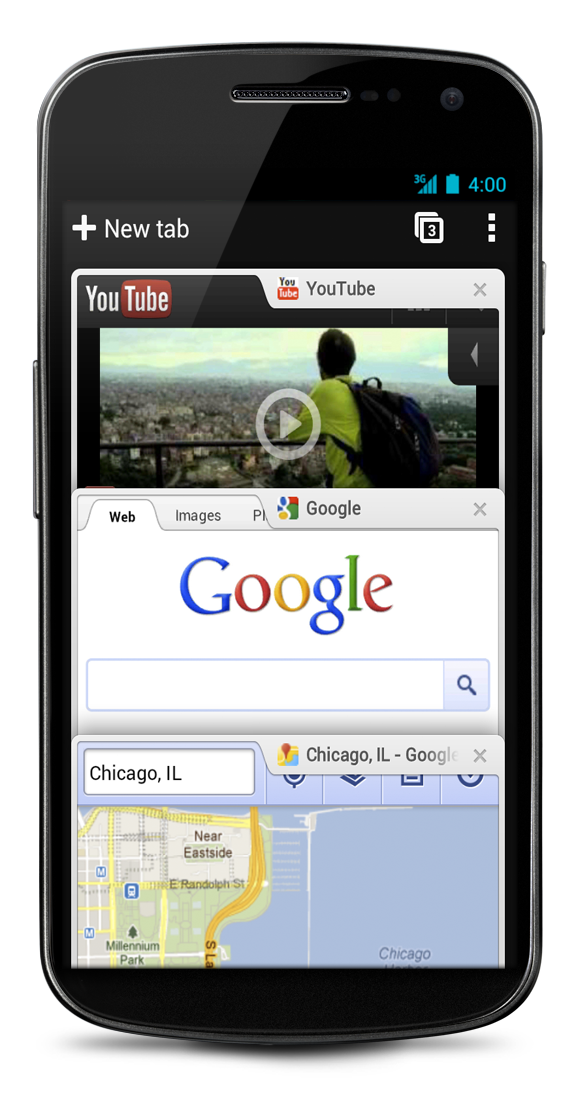
Chrome for Android is designed from the ground up for mobile devices. We reimagined tabs so they fit just as naturally on a small-screen phone as they do on a larger screen tablet. You can flip or swipe between an unlimited number of tabs using intuitive gestures, as if you’re holding a deck of cards in the palm of your hands, each one a new window to the web. One of the biggest pains of mobile browsing is selecting the correct link out of several on a small-screen device. Link Preview does away with hunting and pecking for links on a web page by automatically zooming in on links to make selecting the precise one easier. And as with Chrome on desktop, we built Chrome for Android with privacy in mind from the beginning, including incognito mode for private browsing and fine-grained privacy options (tap menu icon, ‘Settings,’ and then ‘Privacy’).


Sign in
You can now bring your personalized Chrome experience with you to your Android phone or tablet. If you sign in to Chrome on your Android device, you can:
  • View open tabs: Access the tabs you left open on your computer (also signed into Chrome)—picking up exactly where you left off.
  • Get smarter suggestions: If you visit a site often on your computer, you'll also get an autocomplete suggestion for it on your mobile device, so you can spend less time typing.
  • Sync bookmarks: Conveniently access your favorite sites no matter where you are or which device you’re using.
Chrome is now available in Beta from Android Market, in select countries and languages for phones and tablets with Android 4.0, Ice Cream Sandwich. We’re eager to hear your feedback. Finally, we look forward to working closely with the developer community to create a better web on a platform that defines mobile.


(Cross-posted from the Chrome blog and the Official Google blog)

الثلاثاء، 6 مارس 2012

Introducing Google Play: All your entertainment, anywhere you go

(Cross-posted from the Official Google Blog)

Entertainment is supposed to be fun. But in reality, getting everything to work can be the exact opposite—moving files between your computers, endless syncing across your devices, and wires…lots of wires. Today we’re eliminating all that hassle with Google Play, a digital entertainment destination where you can find, enjoy and share your favorite music, movies, books and apps on the web and on your Android phone or tablet. Google Play is entirely cloud-based so all your music, movies, books and apps are stored online, always available to you, and you never have to worry about losing them or moving them again.


With Google Play you can:
  • Store up to 20,000 songs for free and buy millions of new tracks
  • Download more than 450,000 Android apps and games
  • Browse the world’s largest selection of eBooks
  • Rent thousands of your favorite movies, including new releases and HD titles
Starting today, Android Market, Google Music and the Google eBookstore will become part of Google Play. On your Android phone or tablet, we’ll be upgrading the Android Market app to the Google Play Store app over the coming days. Your videos, books and music apps (in countries where they are available) will also be upgraded to Google Play Movies, Google Play Books and Google Play Music apps. The music, movies, books and apps you’ve purchased will continue to be available to you through Google Play—simply log in with your Google account like always.

To celebrate, we’ll be offering a different album, book, video rental and Android app at a special price each day for the next week in our “7 Days to Play” sale. In the U.S., today’s titles include the collection of top 40 hits Now That's What I Call Music 41, the popular game Where's My Water, the novel Extremely Loud and Incredibly Close and the movie Puncture for just 25 cents each. In addition, you'll find great collections of hip-hop, rock and country albums for $3.99 all week, detective novels from $2.99, some of our editorial team's favorite movies from 99 cents, and our favorite apps from 49 cents.

In the U.S., music, movies, books and Android apps are available in Google Play. In Canada and the U.K., we’ll offer movies, books and Android apps; in Australia, books and apps; and in Japan, movies and apps. Everywhere else, Google Play will be the new home for Android apps. Our long-term goal is to roll out as many different types of content as possible to people around the world, and we’ll keep adding new content to keep it fresh.

To learn more, head over to play.google.com/about or keep up with the latest on our Google+ page. If you’re headed to Austin later this week for South by Southwest, come to the Google Village to see Google Play in action. We can’t wait for you to try Google Play and experience a simpler way to manage your entertainment.

الاثنين، 29 أكتوبر 2012

Nexus: The best of Google, now in three sizes

People increasingly have more than one device, and they switch between them many times a day. Nexus—Google’s hardware line for Android devices—gets rid of the hassle. Just sign in with your Google Account and everything is there ready to go, whatever device you’re using: photos, emails, contacts, bookmarks, even your entertainment on Google Play.

Today, we’re excited to announce three great new Nexus devices … in small, medium and large. And they all run Android 4.2, a new flavor of Jelly Bean—which includes the latest version of Google Now and other great new features.


Nexus 4 with Google Now and Photo Sphere 
Nexus 4 is our latest smartphone, developed together with LG. It has a quad-core processor which means it's super fast, a crisp 4.7" (320 ppi) display that's perfect for looking at photos and watching YouTube, and with wireless charging you just set the phone down on a charging surface to power it up, no wires needed. While Nexus 4 is incredibly powerful under the hood, it also features the latest version of Jelly Bean, Android 4.2—the simplest and smartest version of Android yet. Starting with the camera, we've reinvented the photo experience with Photo Sphere, which lets you capture images that are literally larger than life. Snap shots up, down and in every direction to create stunning 360-degree immersive experiences that you can share on Google+ with friends and family—or you can add your Photo Sphere to Google Maps for the world to see.

Android 4.2 brings other great goodies like Gesture Typing, which lets you glide your finger over the letters you want to type on the keyboard—it makes typing fast, fun and a whole lot simpler. Android 4.2 also adds support for wireless display so you can wirelessly watch movies, YouTube videos and play games right on your Miracast-compatible HDTV. 

Learn more about all of the new features in Android 4.2, Jelly Bean, here. 

Google Now—even more useful 
We designed Google Now to make life simpler by giving you the right information at just the right time in easy to read cards, before you even ask. And the feedback has been awesome. So today we’re adding more cards that we hope you’ll find useful. Flight information, restaurant reservations, hotel confirmations and shipping details—how often have you found yourself wading through your email to get this information at the last moment? So next time you book a table for dinner, you’ll get a reminder with all the details without ever having to lift a finger. You’ll also get cards for nearby attractions, interesting photo spots, movies times at nearby theaters or concerts by your favorite artists.

Nexus 7: Thin, light and now even more portable
Nexus 7 brings you the best of Google–YouTube, Chrome, Gmail, Maps–and all the great content from Google Play in a slim, portable package that fits perfectly in your hand. To give you more room for all that great content you can now get Nexus 7 with 16GB ($199) or 32GB ($249) of storage. But we also wanted to make this highly portable tablet even more mobile. So we added HSPA+ mobile data. Nexus 7 is now also available with 32GB and HSPA+ mobile ($299), which can operate on more than 200 GSM providers worldwide, including AT&T and T-Mobile in the US. 

Nexus 10: Powerful and shareable 
Nexus 10 is the ultimate tablet for watching movies or reading magazines. We wanted to build a premium entertainment device, so we partnered with Samsung to do just that. Nexus 10 is the highest resolution tablet on the planet with a 10.055" display at 2560-by-1600 (300ppi), that's over 4 million pixels right in your hands. It comes with a powerful battery that will get you up to nine hours of video playback and more than 500 hours of standby time. With a set of front-facing stereo speakers, you can watch movies right from your Nexus 10 and they simply sound awesome. But what makes Nexus 10 unique is that it's the first truly shareable tablet. With Android 4.2, you can add multiple users and switch between them instantly right from the lockscreen. We believe that everyone should have quick and easy access to their own stuff -- email, apps, bookmarks, and more. That way, everyone can have their own home screens, their own music, and even their own high scores.

Google Play: More entertainment, more countries
We’ve recently added a ton of great new entertainment to Google Play, such as movies and TV shows from Twentieth Century Fox. Earlier this year we expanded our service beyond movie rentals and now you can purchase movies and build a library of your favorites in Google Play. Today we’re bringing movie purchasing to more countries - Canada, the U.K., France, Spain and Australia.
We’re also excited to announce two new partnerships. We’re now working with Time, Inc. to bring you even more magazines like InStyle, PEOPLE, TIME and others. And we’ve partnered with Warner Music Group who will be adding their full music catalog with new songs coming each day. We’re now working with all of the major record labels globally, and all the major U.S. magazine publishers, as well as many independent labels, artists and publishers.

On November 13, we're bringing music on Google Play to Europe.  Those of you in the U.K, France, Germany, Italy and Spain will be able to purchase music from the Google Play store and add up to 20,000 songs—for free—from your existing collection to the cloud for streaming to your Android devices or web browser. We’re also launching our new matching feature to streamline the process of uploading your personal music to Google Play. We’ll scan your music collection and any song we match against the Google Play catalog will be automatically added to your online library without needing to upload it, saving you time. This will be available in Europe at launch on November 13 and is coming to the U.S. soon after. This will all be for free—free storage of your music, free matching, free syncing across your devices and free listening.

Great value
We’ve always focused on building great devices at great value.  And we think today’s devices offer the very best that money can buy. Here are more details on when and where you can pick up your next Nexus device:
  • Nexus 4: 8GB for $299; 16GB for $349; available unlocked and without a contract on 11/13 on the Google Play store in U.S., U.K., Australia, France, Germany, Spain and Canada. The 16GB version will also be available through T-Mobile for $199, with a 2-year contract (check here for more details).
  • Nexus 7: 16GB for $199 and 32GB for $249; available in U.S., U.K., Australia, France, Germany, Spain, Canada and Japan, and also through our retail partners Gamestop, Office Depot, Office Max, Staples and Walmart.
  • Nexus 10: 16GB for $399; 32GB for $499; available on 11/13 in the Google Play Store in the U.S., U.K., Australia, France, Germany, Spain, Canada and Japan. You'll also be able to purchase the 32GB version in over 2,000 Walmart stores in the U.S.
A Nexus device is much more than simply a phone or tablet. It’s your connection to the best of Google—all of your stuff and entertainment, everywhere you go with no hassle.  Now you have three new Nexus devices, a new improved version of Jelly Bean and more entertainment than ever before—all available on Google Play. The playground is open.

الأربعاء، 27 يونيو 2012

Android @ I/O: the playground is open

Last year at Google I/O, we talked about momentum, mobile and more. This year, we’re picking up right where we left off. More than 400 million Android devices have now been activated—up from 100 million last June. And twelve new Android devices are activated every every second—that’s more than 1 million a day. Today, we’re rolling out a new version of Android called Jelly Bean, adding more entertainment to Google Play, and introducing two powerful—yet distinctly different Nexus devices to bring you the best of Google.

Jelly Bean: simple, beautiful and beyond smart
Jelly Bean builds on top of Ice Cream Sandwich. It makes everything smoother, faster and more fluid. For example, notifications are now more dynamic: if you’re late for a meeting or missed a call, you can email or call directly from notifications. The keyboard is smarter and more accurate, and can predict your next word. And voice typing is faster, working even when you don’t have a data connection.

We’ve redesigned search from the ground up in Jelly Bean, with a new user interface and faster, more natural Voice Search. You can type your query or simply ask Google a question. Google can speak back to you, delivering a precise answer, powered by the Knowledge Graph, if it knows one, in addition to a list of search results.

Today’s smart devices still rely on you to do pretty much everything—that is, until now. Google Now is a new feature that gets you just the right information at just the right time. It tells you today’s weather before you start your day, how much traffic to expect before you leave for work, or your favorite team's score as they’re playing. There’s no digging required: cards appear at the moment you need them most.


Starting in mid-July, we’ll start rolling out over-the-air updates to Galaxy Nexus, Motorola Xoom and Nexus S, and we’ll also release Jelly Bean to open source.

Google Play: more entertainment
Google Play is your digital entertainment destination, with more than 600,000 apps and games plus music, movies and books. It’s entirely cloud-based, which means all of your content is always available across all of your devices. Today our store is expanding to include magazines. We’ve been working with leading publishers Condé Nast, Hearst, Meredith and more to offer magazines like House Beautiful, Men’s Health, Shape and WIRED.

Now, you can also purchase movies in addition to renting them. And we’re adding television shows on Google Play—in fact, we’re adding thousands of episodes of broadcast and cable TV shows, like "Revenge," "Parks & Recreation" and "Breaking Bad," from some of the top studios, like ABC Studios, NBCUniversal and Sony Pictures. You can play back movies and TV shows on all your Android devices, through Google Play on the web, and on YouTube, and soon we’ll bring the experience to Google TV devices.

Movie purchases, TV shows and magazines are available today on play.google.com, and will roll out to Google Play on devices over the coming days.

Nexus 7: powerful, portable and designed for Google Play
All of this great Google Play content comes to life on Nexus 7, a powerful new tablet with a vibrant, 7” 1280x800 HD display. The Tegra-3 chipset, with a quad-core CPU and 12-core GPU, makes everything, including games, extremely fast. And best of all, it’s only 340 grams, lighter than most tablets out there. Nexus 7 was built to bring you the best of Google in the palm of your hand. Hang out with up to 10 friends on Google+ using the front-facing camera, browse the web blazingly fast with Chrome and, of course, crank through your emails with Gmail.


Nexus 7 comes preloaded with some great entertainment, including the movie "Transformers: Dark of the Moon," the book “The Bourne Dominion,” magazines like Condé Nast Traveler and Popular Science, and songs from bands like Coldplay and the Rolling Stones. We’ve also included a $25 credit to purchase your favorite movies, books and more from Google Play, for a limited time. Nexus 7 is available for preorder today from Google Play in the U.S., U.K., Canada and Australia, and starts at $199 in the U.S. It will start shipping mid-July.

Nexus Q: It’s a sphere!
It's great to be able to take your entertainment with you wherever you go, but sometimes you want to ditch the headphones and enjoy music with friends and family. So we’re introducing Nexus Q, which combines the power of Android and Google Play to easily stream music and video in your home—all controlled by an Android phone or tablet. Designed and engineered by Google, Nexus Q is a small sphere that plugs into the best speakers and TV in your house. It’s the first-ever social streaming device—like a cloud-connected jukebox where everyone brings their own music to the party. Available first in the U.S., you can preorder Nexus Q today from Google Play for $299, and it will ship mid-July.


If you own one of the 400 million Android devices out there, you already know that it’s much more than simply a phone or tablet. It’s your connection to the best of Google—all of your stuff and entertainment, everywhere you go. Now you have a new version of Android, more entertainment and a growing portfolio of Nexus devices to choose from—all available in Google Play. The playground is open.

الأربعاء، 24 يوليو 2013

From TVs to tablets: Everything you love, across all your screens

When I was growing up, my family had a single screen we huddled around every day: the television set in the living room. Nowadays, we “huddle” around multiple screens—laptops, smartphones and tablets—using them almost interchangeably as we navigate through our day. In a world of ubiquitous computing, life would be a lot simpler if we didn’t have to learn new behaviors and interfaces each time we switched screens—if we could have one consistent, intuitive experience no matter where we are or what we’re doing. Today, with the launch of Chromecast and the new Nexus 7 tablet, it’s even more effortless to enjoy content you care about—whether it’s video, music, movies, games—wherever you are, across your devices. Introducing ChromecastTo help make it easy to bring your favorite online entertainment to the biggest screen in your house—the TV—we’re introducing Chromecast. Chromecast is a small and affordable ($35) device that you simply plug in to your high-definition (HD) TV and it allows you to use your phone, tablet or laptop to "cast" online content to your TV screen. It works with Netflix, YouTube, Google Play Movies & TV, and Google Play Music, with more apps like Pandora coming soon. With Chromecast, we wanted to create an easy solution that works for everyone, for every TV in the house.


Remote-freeOnce your Chromecast is set up, you can use your phone, tablet or laptop to browse and cast content to your TV, play and pause, control the volume, and more. But unlike other streaming solutions, you can still multitask—send emails or surf the web—while enjoying what’s on the TV screen. It works across platforms—Android tablets and smartphones, iPhones, iPads, Chrome for Mac and Windows (more to come), so your personal device is also now your remote control. Cast the web to your TVIn addition to apps like Netflix, you can use Chromecast to bring a broad range of content available on the web to your big screen, thanks to a new feature in the Chrome browser that allows you to project any browser tab to your TV. From sharing your family photos to enjoying a video clip from your favorite news site, it’s as simple as pressing a button. This feature is launching in beta, but we’re excited for people to try it out and give us their feedback.

 
Google Cast SDK preview for developersTo ensure a great Chromecast experience over time, we've built Google Cast, a technology that enables developers to build consistent, intuitive multi-screen experiences across mobile devices and TVs. Today, we’re launching a preview version of Google Cast with more information for developers on our Google Developers blog. A handful of early developers are already working on enabling Google Cast technology in their apps, so more supported apps are coming soon. And while the Chromecast device is the first instantiation of Google Cast, we expect the technology to be embedded in a range of hardware from our partners in the future.


The new Nexus 7—the sharpest 7” tablet screen everTogether with ASUS, we took what you loved about the original Nexus 7 and made it even better. The first thing you’ll notice is the sharpness of the screen: the 323 pixels packed into every inch of the screen makes it the world's highest-resolution 7-inch tablet. It’s lighter than ever, with more than nine hours of HD video playback and 10 hours of web browsing or reading. Nexus 7 now features stereo speakers and virtual surround sound from Fraunhofer (the inventors of the MP3 format), giving you rich and immersive audio. Android 4.3—a sweeter Jelly BeanNexus 7 is the first device to ship with Android 4.3, the newest version of Android. Tablets are perfect for sharing with others, so in Android 4.3, we're introducing restricted profiles, which let you limit access to apps and content. For example, restricted profiles enable parental controls, so certain family members are prevented from accessing mature content. Likewise, retail stores can use tablets to show off product information, and shops can use tablets as point of sale systems. Android 4.3 also now supports Bluetooth Smart technology, opening the door to mobile apps that connect to new devices like fitness sensors. Android 4.3 is rolling out to Nexus devices starting today. Ready to PlayThe new Google Play Games app brings your friends together with the games you love, where you can invite a friend and start challenging gamers around the world, compete for top achievements, and race to the top of the leaderboard. You can also enjoy the world’s largest collection of eBooks, listen to millions of music tracks and immerse yourself in thousands of movies, TV shows, magazines and apps on Google Play. Plus, Nexus 7 comes loaded with your favorite Google apps, like Chrome, Maps, YouTube, Gmail and Google Now.

 
How to get Chromecast and the new Nexus 7Starting today, the Chromecast device is available for $35 on Google Play, Amazon.com and BestBuy.com. It will be available in Best Buy stores across the U.S. starting July 28. For a limited time, you also get three months of Netflix included. More info available in Google Play. Nexus 7 starts at $229, and is available in the U.S. beginning July 30 (with more countries coming soon!). Buy Nexus 7 online on Google Play, or check it out at Best Buy, Gamestop, Walmart, Staples, Office Max, Office Depot, Amazon, Home Shopping Network, Radio Shack, J&R and B&H Photo. Nexus 7 (LTE) is coming soon with support for T-Mobile and Verizon in the coming weeks. Learn more on our Nexus site.

الأربعاء، 15 مايو 2013

Android@I/O: Just press Play

As our developer audience knows, Android is more than simply a phone or tablet. It’s a platform, an ecosystem, and an opportunity for developers around the world to build exciting services and apps that reach millions of people every day. The flexibility and openness of Android provides developers--and Google, through services like Google Now--the opportunity to build simple, beautiful experiences across multiple devices.

Here’s a quick look at what we announced today at Google I/O, our annual developer conference:

Developers, the heart of Google Play 
Just a year after launch, there are now more ways than ever for developers to monetize their apps in Google Play, and for users to discover and enjoy apps and entertainment. We’ve passed 48 billion app downloads, with more than 2.5 billion downloads in the last month alone. Today, we launched a range of new tools, including services for game developers. For users, this means that you’ll be able to challenge your friends on Google+ to real-time multiplayer competitions, or race against them to the top of the leaderboards. (Check out a few of our favorites: World of Goo, Super Stickman Golf 2, Beach Buggy Blitz, Eternity Warriors 2, and Osmos).

Our library is your library: Google Play Music All Access 
Google Play Music All Access is a new monthly music subscription service that lets you listen to millions of songs across your devices. You can create a radio station from any song or artist you love, browse recommendations from our expert music team or explore by genre. And when millions of songs just aren’t enough, Google Play Music lets you combine our collection with your own collection. You can store 20,000 songs for free in the cloud and listen to them alongside the All Access catalog. It’s $9.99 a month, and you can try it free for the first month. Or better yet, start your trial by June 30 and you’ll pay only $7.99 a month.


Google Play for Education: Android goes to school 
Imagine a world in which all classrooms and students are connected to the web. While such a vision will take the efforts of many, Google has contributed to this endeavor through Google Apps and Chromebooks. Today we are excited to expand Google’s education offering by combining the ease and portability of Nexus tablets with highly engaging educational content. Through this new program educators will be able to manage tablets and discover, purchase, and distribute content through Google Play for Education--whether they're in charge of one classroom or one thousand. We’re inviting developers to get started now to create world class educational apps for grades K-12. Schools interested in learning more can sign up here.

Samsung Galaxy S4 on Google Play 
Next month, we are adding a new Android device to the store to join our current lineup of Nexus phones and tablets. We’ve worked closely with Samsung to create a special Samsung Galaxy S4 exclusively for Google Play. It brings together cutting edge hardware from Samsung with Google’s latest software and services -- including the user experience that ships with our popular Nexus devices. Starting June 26, it will be available with no contract for $649, supporting both T-Mobile and AT&T, with LTE.


Hugo Barra VP, Product Management, Android

الأربعاء، 9 مايو 2012

Shop and travel smarter with Google Maps 6.7 for Android - now with Google Offers and indoor walking directions

(Cross-posted on the Lat Long Blog)

Wherever you are, Google Maps for Android helps you get around and discover new places. Today with the 6.7 release we will help you find offers from nearby businesses in the U.S. -- everything from restaurants, to salons, to city tours. Also, we’ve added indoor walking directions in the U.S. and Japan, plus 360-degree interior photos of businesses, to help you intrepidly make your way indoors and out.

Discover great offers near you
Today, in the U.S. only, we’re launching a way to discover nearby Google Offers in Google Maps for Android. To see great deals near you, tap on “Maps” to open the dropdown menu and then tap on “Offers.” If you see something you like you can click on it to learn more. Some Google Offers can be purchased and saved for later while others are immediately available for free. With free Google Offers, press “Use now” to redeem instantly or “Save for later” for future use. You can also opt-in to receive notifications in the app when there are offers near you.


Explore the great indoors with walking directions and Business Photos.
Since we launched indoor maps in the U.S. and Japan in Google Maps for Android last November, business owners have been adding their floor plans to our maps with Google Maps Floor Plans. Today, we are launching indoor walking directions for participating venues in these countries. This will help you get directions not only to a building’s front door, but also through those doors to the places where you want to go inside.

Get Indoor walking directions in indoor maps (photo: Macy’s San Francisco)

With Google Business Photos you can explore panoramic photos of the inside of a business from the palm of your hand. Now you can get a feel for a restaurant or store inside as well as outside using Street View technologies. To access these 360-degree panoramic views, look for the “See Inside” section on the Place page of select businesses.

See the interior of participating businesses with Business Photos (photo: Toyjoy)

Download Google Maps 6.7 for Android from Google Play, and use it as your trusted guide to help you find and discover places to eat, shop and play! You can also learn more about other great features on the Google Maps YouTube channel.

الأربعاء، 27 يونيو 2012

A new friend just moved into the neighborhood...

The statues on the front lawn of the Android building got a new friend this afternoon...
   

Also, you may have noticed we did a little redecorating. We’ve been asking you what content you wanted to see more of on the Google Mobile blog, and the answer was quite clear: more Android! This blog, in addition to the +Android page on Google+, will be your place to find all the latest news from the Android team.

See you tomorrow at I/O!

Posted by: Hugo Barra, Director of Product Management, Android

الثلاثاء، 24 أبريل 2012

Galaxy Nexus now on sale in Google Play

We started shipping Nexus phones more than two years ago to give you a pure Google experience and access to the latest Android updates. Today, we’ve started selling Galaxy Nexus (HSPA+) from a new Devices section in the Google Play web store, so you can quickly and easily purchase an unlocked version of the phone. We want to give you a place to purchase Nexus devices that work really well with your digital entertainment.

Galaxy Nexus by Samsung runs the latest Android software, Ice Cream Sandwich, with Google mobile services, Google Play and new features like Android Beam and Google+ mobile hangouts. It also offers a 4.65” HD Super AMOLED display that’s perfect for watching movies, playing games or reading books on the go.

First available in the U.S., Galaxy Nexus costs $399 and arrives at your door unlocked, without a carrier commitment or contract. You can use it on the GSM network of your choice, including T-Mobile and AT&T. It also comes pre-installed with the Google Wallet app which lets you easily make purchases and redeem offers with a tap of your phone. Best of all, we'll give you a $10 credit to get you started with your new mobile wallet.

We’ve come a long way since the first Android devices started hitting shelves three and a half years ago and since the launch of the first Nexus device. More than 300 million Android devices have been activated globally. We’ve worked with developers and content partners to launch Google Play, offering more than 500,000 apps, millions of songs and books, and thousands of movies. And we’ve implemented new customer support services to improve the purchasing experience on Google Play. We’ve taken all of this into consideration in designing Devices on Google Play. We hope to bring it to more countries soon.

الأربعاء، 22 مايو 2013

A smoother Drive app for Android

(cross-posted to the Google Drive Blog)

The process of creating and accessing your stuff shouldn’t be, well...a process. Today, the Drive app for Android is getting several improvements to make creating and accessing your stuff on-the-go even easier.
To help you find the content you care about, Drive files will now be displayed in a clean, simple card-style. You can swipe between files to see large previews that let you quickly review and discover the information you’re looking for. And if you want to keep some Drive files on your Android device, you’ll now be able to “download a copy” from the actions menu inside settings.


The updated Drive for Android app also gives you to a way to keep track of important paper documents like receipts, letters, and billing statements. Simply click “Scan” from the Add New menu, snap a photo of your document, and Drive will turn the document into a PDF that’s stored for safekeeping. And because Drive can recognize text in scanned documents using Optical Character Recognition (OCR) technology, a simple search will retrieve the scanned document later. No more frantic scrambling through drawers looking for a receipt or digging through your pockets to find that business card -- just scan, upload and search in Drive.


The editing experience in Google Sheets has also gotten some improvements: now you can adjust font types and sizes for a spreadsheet and tweak the cell text colors and cell alignment right from the app. Plus, the Drive app comes with Cloud Print support so you can print anything from Drive with a Cloud Ready printer -- perfect if you need to, say, print that extra resume right before a job interview.

Get the Google Drive app today on Google Play and circle us on Google+ for continued updates. 

Posted by Denis Teplyashin, Software Engineer

الأربعاء، 29 مايو 2013

Google Calendar Update for Android: Custom Colors and More

One of the most requested features we’ve seen so far for Google Calendar on Android is the ability to customize event and calendar colors directly from your device. Today’s update allows you to do just that. Now you can highlight those super-urgent meetings and important birthdays, or just switch up the color of your calendar whenever your heart desires.


Adding events is now easier and more fun with our redesigned date and time pickers, which let you schedule your special dinner date or the start of your well-deserved vacation in a snap.


For all of you world travelers, our redesigned timezone picker makes it simpler to find the region that you’re looking for, whether you’re in San Francisco, Tokyo or Zurich.

Finally, it’s easier to schedule repeating events. You can now set events to repeat every Tuesday and Thursday, every month, or every 7 weeks, it’s completely up to you.

The latest version of Google Calendar is built for devices running Android 4.0.3 and above (Android 4.1 or higher for custom event colors). Get it on Google Play, rolling out over the course of the day, and let us know what you think.

Posted by James Kung, Software Engineer

الأربعاء، 22 فبراير 2012

Collaborate and edit anywhere with the updated Google Docs for Android

As I was sitting on the ferry commuting to Google’s Sydney office this morning, two thoughts occurred to me. First, Australia is beautiful. If you’ve never been here, you really should visit. And second, it’s amazing how productive I can be with just my Android phone and an Internet connection. I was responding to email, reading news articles, and editing documents—just like I do at the office. Only the view was better!

We want to give everyone the chance to be productive no matter where they are, so today we’re releasing a new update to the Google Docs app for Android. We've brought the collaborative experience from Google Docs on the desktop to your Android device. You'll see updates in real time as others type on their computers, tablets and phones, and you can just tap the document to join in.

We also updated the interface to make it easier to work with your documents on the go. For example, you can pinch to zoom and focus on a specific paragraph or see the whole document at a glance. We also added rich text formatting so you can do things like create a quick bullet list, add color to your documents, or just bold something important. Watch the new Google Docs app in action:


If you want to hear about the latest Docs news or send us feedback on the new app, visit Google Docs on Google+.

Gotta run—I’ve got another ferry to catch!

الخميس، 13 ديسمبر 2012

Introducing Magazines on Google Play for the UK

Following hot on the heels of the recent launch of music on Google Play in the UK, we’re pleased to announce that from today, you’ll also be able to buy digital versions of your favourite magazines for reading on the go.

Popular titles from some of the world’s leading publishers such as Condé Nast UK, Dennis Publishing, Future, Haymarket, Hearst UK, Immediate Media and IPC Media are now available for purchase on your Android phone or tablet.

Get in shape with Men’s Fitness, cook up a storm with olive, work off all that turkey and Christmas pudding with Slimming World, catch up on the latest must-have gadgets with T3 and read a preview of The Hobbit in this month’s edition of Total Film.

You can stay abreast of the week’s key events with Hello!, New Statesman and The Spectator and keep on top of the latest lifestyle news with Cosmopolitan, Glamour and Tatler. Petrolheads can pick out some new wheels with What Car?, while domestic goddesses can take their inspiration from Good Housekeeping.

Browse the Play Store to find your favourite magazines, discover new titles with a 30-day free trial, buy single issues or purchase a money-saving monthly or annual subscription to leading titles such as Elle, Harper’s Bazaar, Vogue and Wired. New Nexus devices even come pre-loaded with free issues of Men’s Fitness, .net and Vogue to get you started.

All your latest issues will be instantly available on your Android tablet or phone, or online, using our web reader, and organised in your collection in the cloud. You can flip through your magazine carousel to quickly decide what to read next or simply search for a specific title in your magazine collection.


Magazines are available today to enjoy on the sofa or on the go via your Android devices and on play.google.com, so please take a look.

Posted by Avi Yaar, Product Manager, Google Play